

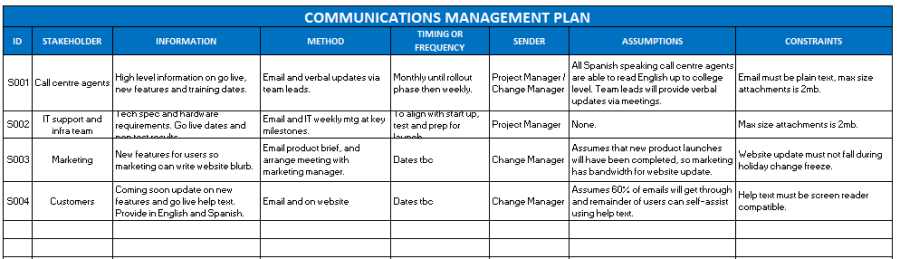
Successful projects are all about people. The Communications Plan is a PMBOK document which sets out how you will inform your project team and stakeholders. It describes what information you will provide, when, how and to whom. stakeholdermap.com
- Information that will be communicated
- How it will be communicated, e.g. email, verbal
- The timing and frequency
- The sender
- Any assumptions and any constraints
In the PMBOK Guide - Sixth Edition, the Communications Management Plan is an output of 10.1 Plan Communications Management and is updated throughout the project. The Communications Plan is an important part of managing stakeholders and will link to your Stakeholder Register and Stakeholder Engagement Plan.
Why is a Communications Management Plan important?
A Communications Management Plan is important because it gives the project manager a clear structure for keeping people informed, involved and aligned. Without a plan, project communication can become reactive. Updates are sent only when someone asks for them, important stakeholders may be missed, and different groups may receive inconsistent information.
Good communication helps prevent confusion about project objectives, deadlines, risks, decisions and responsibilities. It also helps stakeholders understand what is changing, why it is changing, when it will happen and what they need to do next.
A well-prepared Communications Management Plan helps you to:
- Keep stakeholders informed - so that sponsors, team members, suppliers and users receive the information they need at the right time.
- Manage expectations - by making it clear what will be communicated, how often updates will be provided and who is responsible for sending them.
- Support decision-making - by ensuring that senior stakeholders receive timely information about progress, issues, risks, changes and decisions required.
- Reduce misunderstandings - by using agreed messages, channels and formats rather than relying on informal or inconsistent updates.
- Improve stakeholder engagement - by matching communication to the needs, interests and influence of different stakeholder groups.
- Create accountability - by assigning an owner or sender for each planned communication.
- Provide an audit trail - by documenting what communications are planned and how important project information will be shared.
The Communications Management Plan should not be treated as a one-off document. It should be reviewed and updated as the project changes. For example, new stakeholders may be identified, risks may increase, delivery dates may move, or a project may enter a more sensitive phase where more frequent communication is needed.
In practice, the plan helps the project manager move from ad hoc communication to planned, purposeful communication. This makes it easier to keep the project team focused, give stakeholders confidence, and make sure important information reaches the right people before problems arise.
Preview of the template
This is a FREE Communications Management Plan Template in Word and PDF. The template is fully editable with Microsoft Word and can be converted or changed to suit your project requirements.
See what is in the Template! Check out the Contents complete with Hints and Tips on how to use.
Check out the contents below or Grab the template now!
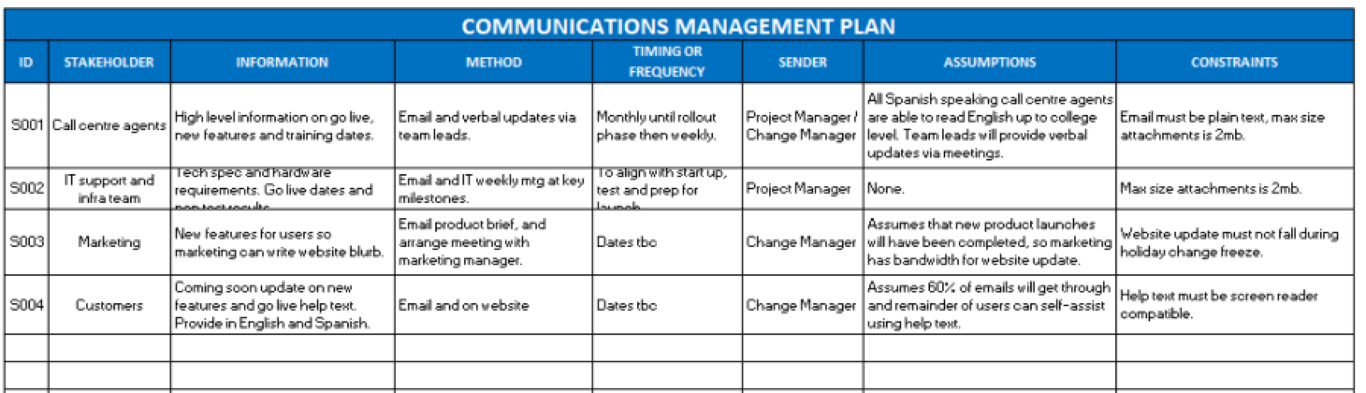
Communications Management Plan example
The example below shows how a Communications Management Plan might be completed for a simple system implementation project. In this example, the project is introducing a new online system that will affect senior managers, the project team, technical support staff and end users.
The purpose of the plan is to make sure that each stakeholder group receives the right information, at the right time, using the most appropriate communication method.
| Stakeholder | Information to be communicated | Method | Timing / frequency | Sender | Assumptions / constraints |
|---|---|---|---|---|---|
| Project Sponsor | Overall project progress, key risks, budget position, major issues and decisions required. | Steering group report and meeting. | Monthly, or more frequently if a major issue arises. | Project Manager | Assumes the sponsor is available for monthly steering group meetings. |
| Project Team | Task progress, upcoming deadlines, dependencies, open issues, decisions and actions. | Weekly project team meeting and action log. | Weekly. | Project Manager | Team members must update their actions before each meeting. |
| End Users | What is changing, why the change is happening, benefits of the new system, training dates, go-live date and support arrangements. | Email updates, intranet page, FAQs and briefing sessions. | Four weeks before go-live, two weeks before go-live, and again during the first week after launch. | Change Manager | Assumes users have access to email and the intranet. Briefings may need to be recorded for users who cannot attend. |
| IT Support Team | Technical implementation details, support model, known issues, escalation route and incident process. | Technical briefing, support documentation and handover meeting. | Two weeks before go-live, with a final check one week before launch. | Technical Lead | Support documentation must be complete before the handover meeting. |
| Department Managers | Impact on their teams, key dates, training expectations and any actions required from managers. | Manager briefing note and short online briefing session. | Three weeks before go-live and one week before go-live. | Project Manager | Managers need enough notice to release staff for training. |
| External Supplier | Delivery deadlines, testing issues, defect priorities, change requests and deployment expectations. | Supplier meeting, issue log and email confirmation of key decisions. | Weekly during build and testing; daily during go-live week if required. | Project Manager | Contractual response times may limit how quickly issues can be resolved. |
This example shows why it is useful to separate stakeholders into groups. A senior sponsor does not need the same level of detail as the IT support team, and end users do not need the same information as the external supplier. The communication method, timing and level of detail should be matched to the needs of each audience.
For larger or more complex projects, you may also want to add columns for communication status, approval required, key message, feedback received or links to supporting documents.
The contents of the Communications Management Plan Template
Project details and document control
- Project Name and Reference
- Project Manager
- Document Date
Stakeholder ID
Stakeholder
Information
Method
For example:
| Weekly project update sent via email to all team members. | |
| Monthly steering committee meeting with senior stakeholders. | |
| Regularly updated project webpage with milestones and FAQs. | |
| One-off launch event to demonstrate the new system to end users. | |
| Quarterly performance report shared with executive sponsors. |
Timing or Frequency
For example:
- Weekly status email every Friday afternoon to the project steering group — ensures senior stakeholders receive a regular update on progress, risks, and next steps.
- One-off briefing session two weeks before go-live with the customer service team — focused on explaining new system features, FAQs, and support procedures.
- Monthly dashboard report for executive sponsors.
- Immediate incident alerts (within 2 hours) for IT operations if a critical issue arises.
Sender
Assumptions
Constraints
Communications Management Plan Template
Excel download - Communications Management Plan Template (.xls)
Excel download - Communications Management Plan Template (.xlsx)
OpenDocument Spreadsheet download - Communications Management Plan Template (.ods)
Stakeholder Register Template
The 10 barriers to good communication
References
Institute, P.M. (2017) A Guide to the Project Management Body of Knowledge. 6th edn. Newtown Square, PA: Project Management Institute.More Project Templates to download!
- Microsoft Project Plans – real world project plans in Microsoft Project.
- Project Management Templates – All of our FREE project management templates in Word and Excel
PMBOK Management Plans
- 20 Common Project Risks