

Excel Resources, Templates and Tips
Practical Excel resources for people who use spreadsheets to get actual work done: free templates, spreadsheet tips, and fixes for the little Excel traps that quietly wreck your data.
Excel is brilliant. Excel is also a menace. It can organise your work, automate your calculations and make you look frighteningly competent. It can also let someone merge cells across a perfectly good table, type the same name five different ways, and bypass your carefully built data validation dropdown with one casual drag of the fill handle.
This section brings together our Excel pages, including free templates and practical guides to common spreadsheet problems.
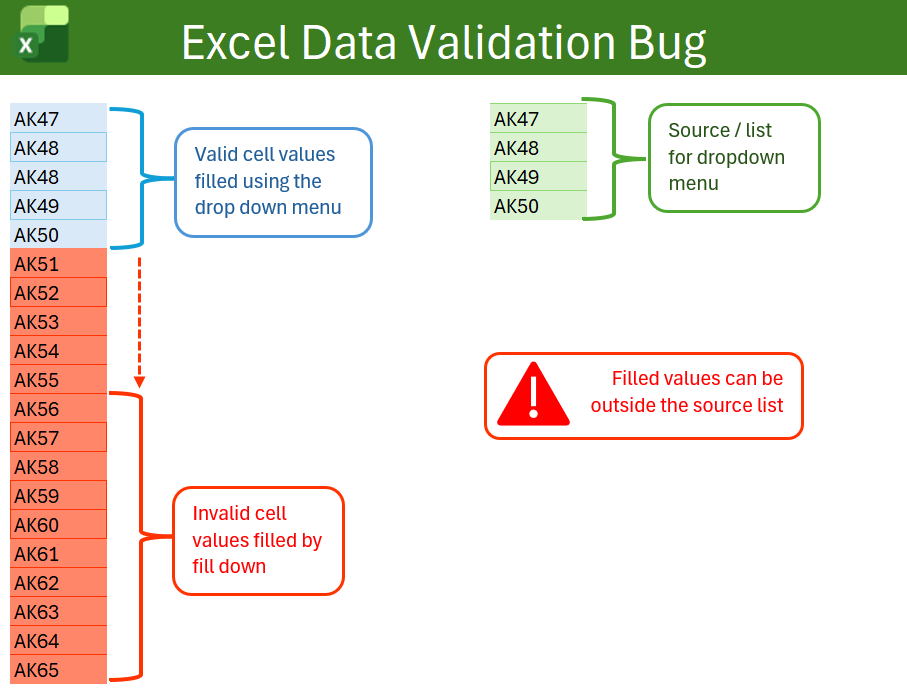
Excel Data Validation Bug? How Fill Down Can Bypass Dropdown Lists
Excel dropdown lists are useful, but they are not foolproof. This guide shows how Fill Down can create values that are not in the approved data validation source list, and how to use conditional formatting to flag the problem.
Free Excel Templates to Download
Browse free Excel templates for planning, task management, stakeholder management, project work and everyday spreadsheet admin. Download the templates and adapt them for your own work.
Excel guides
These pages focus on practical spreadsheet problems: data validation, formatting, cleaning, reporting, and avoiding the mistakes that make workbooks harder to use.
Excel templates
Need a ready-made workbook rather than another lecture about spreadsheet hygiene? Start with the template index.
Why this section exists
Spreadsheets are everywhere because they are fast, flexible and familiar. That is also why they cause so many problems. A workbook can start as a simple list and slowly mutate into a business-critical system held together by hope, hidden columns and one person who knows where the formulas live.
The aim of these Excel resources is to help you build better spreadsheets, spot common risks, and avoid the kind of workbook behaviour that makes everyone quietly furious.