

TOWS is an extension of the popular SWOT analysis tool. TOWS stands for Threats, Opportunities, Weaknesses and Strengths. stakeholdermap.com
Use TOWS to turn your SWOT findings into practical strategies. Start with external threats and opportunities, then match them with your internal strengths and weaknesses. These connections help you decide what to do next.
Both SWOT and TOWS consider internal and external factors. TOWS adds a structured way to combine them. This guide takes you through the four combinations, a worked example and the steps needed to turn your choices into an action plan.
Download the free TOWS template
Table of contents
- TOWS vs SWOT: which template do you need?
- TOWS analysis example: responding to a competitor
- The four TOWS strategies: SO, ST, WO and WT
- How to do a TOWS analysis
- Combining SWOT and TOWS
- Turn your strategies into an action plan
- Common TOWS mistakes
- What the free template includes
- How to use the template
- Download the TOWS template
- More SWOT templates
TOWS vs SWOT: which template do you need?
Our six Excel SWOT and TOWS templates give you a choice of formats. The five SWOT layouts help you record and present your findings. This TOWS guide helps you use those findings to choose a response.
| Your task | Choose | What you work towards |
|---|---|---|
| Record strengths, weaknesses, opportunities and threats | A SWOT layout from the collection | A clear picture of your current position |
| Combine those findings and decide how to respond | This TOWS template and guide | Possible strategies that link internal and external factors |
| Assign work and check progress | An action list or project plan after your TOWS analysis | Agreed tasks, owners, dates and measures |
A thorough SWOT exercise can also lead to action. TOWS makes that step explicit by asking you to work through four types of strategy.
Isn't TOWS just SWOT written backwards? The letters are reversed, but the useful part is how you connect the findings.
A SWOT analysis often ends with a list under each heading. Even when the points matter to your business, a list alone does not tell you which response to choose.

TOWS analysis example: responding to a competitor
Imagine you sell a software product called widgetX. Your team identifies this threat in a fictional planning exercise:
ACME have just released a new product that is seen as more innovative than our widgetX.What are you going to do about it?
This is where TOWS comes in. Ask how your strengths can help you respond, and which weaknesses leave you exposed. You might come up with these strategies:
How can we use our strengths to reduce threats?
We have strong security. We will explain this advantage in our marketing materials and train our sales force to emphasise it when we are in competition with ACME.How can we reduce our weaknesses to reduce threats?
We will increase our product releases from one to two per year. That way we can offer a more agile and rapid roadmap to greater innovation.The first response uses a strength to address a threat (ST). The second tackles a weakness that makes the threat worse (WT). Before agreeing to faster releases, check that your team can deliver them without weakening security.
The four TOWS strategies: SO, ST, WO and WT
Each pair joins one internal factor with one external factor. The letters show which factors you are matching.
| Strategy | Question to ask | Fictional widgetX example |
|---|---|---|
| SO: strengths and opportunities | How can we use a strength to take advantage of an opportunity? | Use our strong security to demonstrate widgetX to buyers whose customer research shows a growing need for secure software. |
| ST: strengths and threats | How can we use a strength to reduce a threat? | Train the sales team to explain our security advantage when buyers compare widgetX with ACME's new product. |
| WO: weaknesses and opportunities | How can an opportunity help us overcome a weakness? | Explore a partnership with a testing provider that has spare capacity, helping us address our slow release process. |
| WT: weaknesses and threats | How can we reduce a weakness and limit our exposure to a threat? | Improve our release process so we can move from one release to two each year and respond to ACME sooner. |
For WO strategies, also ask what you need to improve before you can use an opportunity. For example, a promising new market may be out of reach until you improve customer support.
You do not need to force a strategy into every box. Keep the combinations that make sense and record any assumptions you need to check.
How to do a TOWS analysis
To perform your own TOWS analysis think about your business or project and answer these questions:- How can you use your strengths to take advantage of opportunities?
- How can you use your strengths to reduce threats?
- How can you take advantage of opportunities to reduce your weaknesses?
- How can you reduce your weaknesses to avoid threats?
1. Agree the decision and scope
Choose one business, product, team or project. Write down the decision you need to make and the period you are considering. For widgetX, the question might be: “How should we respond to ACME over the next 12 months?”
2. Check threats and opportunities
Look outside your organisation. Review customer needs, competitors, suppliers and market changes. Separate evidence from guesses. “Three customers asked for stronger security this month” is more useful than “security is a growing market”.
3. Check strengths and weaknesses
Look at your skills, products, finances, systems and capacity. Explain why each point matters to the decision. Label your findings S1, W1, O1 and T1 if this helps you trace each strategy back to its starting point.
4. Match the factors
Work through SO, ST, WO and WT using the questions above. Write a possible response for each useful match. Be specific about the connection: “Use S1, our security expertise, to respond to T1, ACME's new launch.”
5. Compare your choices
Discuss the likely benefit, cost, time, risks and people needed for each strategy. Ask what evidence would change your mind. Choose a manageable set of actions rather than treating every idea as a commitment.
6. Agree the next steps
Give each chosen action an owner, a target date and a way to check the result. Set a review date. If the market changes or an assumption proves wrong, revisit the strategy.
Combining SWOT and TOWS
TOWS and SWOT are complementary tools. You can use TOWS as an extension of your SWOT analysis to develop a more comprehensive and actionable list of strategies.
SWOT can become a “so what?” exercise if you stop at four lists. We recommend following it with TOWS when you need to decide what to do. If your SWOT workshop has already produced clear, tested strategies, use TOWS to check for combinations you may have missed.
What does TOWS stand for?
TOWS stands for Threats, Opportunities, Weaknesses and Strengths.What is the TOWS model?
The TOWS model is a framework for business strategy development. It takes into account both the internal and external factors that can impact an organisation. The model helps businesses to identify potential opportunities and threats, as well as to develop strategies that use strengths and address weaknesses.What is the significance of TOWS analysis?
TOWS analysis is a valuable tool for businesses because it forces them to consider both the internal and external factors that can impact their operations. Additionally, it helps businesses to develop strategies for dealing with potential opportunities and threats. Ultimately, TOWS analysis can help businesses to be more proactive in their approach to business planning.Turn your TOWS strategies into an action plan
A strategy sets your direction. An action states who will do what and by when. Keep the detailed action list alongside your analysis, in a separate worksheet or your usual project plan.
Example: put the widgetX security strategy into practice
- Strategy: Use our security strengths to compete with ACME.
- Action: Prepare a checked security comparison and train the sales team to use it.
- Owner: Sales manager, with support from the security lead.
- Target date: Within four weeks of agreeing the strategy.
- Measure: Record training completion and track customer feedback and sales results where security affects the decision.
- Review: After eight weeks, check whether the approach helps customers understand the difference.
These timings are examples, not targets built into the download. Agree dates and measures that fit your own team. A change in sales alone will not prove that the strategy worked, so check other possible causes too.
Common TOWS mistakes
- Repeating the SWOT list. “Strong security” is a finding. Explain how you will use that strength.
- Mixing up internal and external factors. A slow release process is an internal weakness. A competitor's launch is an external threat.
- Writing vague strategies. Replace “improve marketing” with a clear audience, message and action.
- Matching every factor with every other factor. Keep useful connections. A full matrix is not the goal.
- Ignoring trade-offs. Faster releases may need extra testing, funding or fewer features.
- Leaving without owners. Assign the work and book a review before you finish.
Get a free TOWS template
We think TOWS should be used to turn every SWOT analysis into actionable strategies, so we are sharing our template with you. The spreadsheet is easy to edit and share with team members. The download is free. Use Excel for the Excel formats, or compatible spreadsheet software for the OpenDocument version.The template is set to fit on to 1 page of A4 in Landscape mode. You can download this for FREE in xlsx, xls and OpenDocument Spreadsheet .ods format.
You don't need any technical skills to use this template and it is free of formulas and macros. Instructions are included in the Workbook and below, but there is nothing to stop you getting started immediately.
How to use the template
- Click into each row to enter text.
- All text is set to wrap around within the cell. To change these options use Alignment in the Home menu.
- If you need more rows right click and select Insert, then Entire row.
- When you click the arrows the Shape Format menu will appear. Here you can format size, colour, outline, effects, alignment, etc.
- Printing - the SWOT sheet is set to print on Landscape and to fit on one page. To change the print area go to Page Layout, Print Area. To change page size or orientation go to File, Print.
Download the free TOWS analysis template
Excel TOWS analysis template xlsx
Excel xls download
OpenDocument Spreadsheet TOWS Template
More SWOT analysis templates in Excel
Still gathering your findings? Compare the six SWOT and TOWS templates, or choose one of the SWOT layouts below. Return to this guide when you are ready to connect your findings and develop strategies.
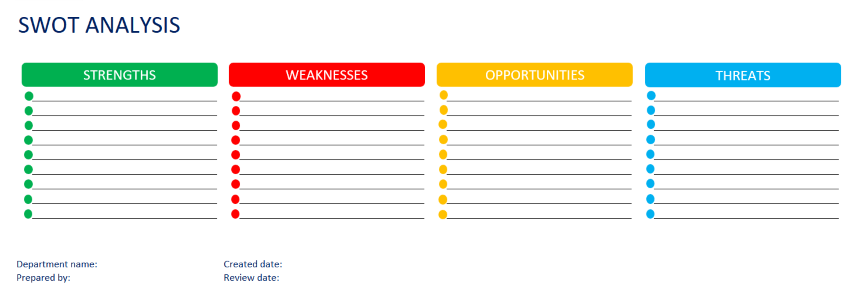
SWOT template - Excel example horizontal boxes
SWOT Analysis Template | Excel black background

SWOT Analysis Template grid format in Excel

SWOT Analysis Template | Excel example with central image

SWOT Analysis | Excel Template FREE

