

Free Skills Matrix Template in Excel
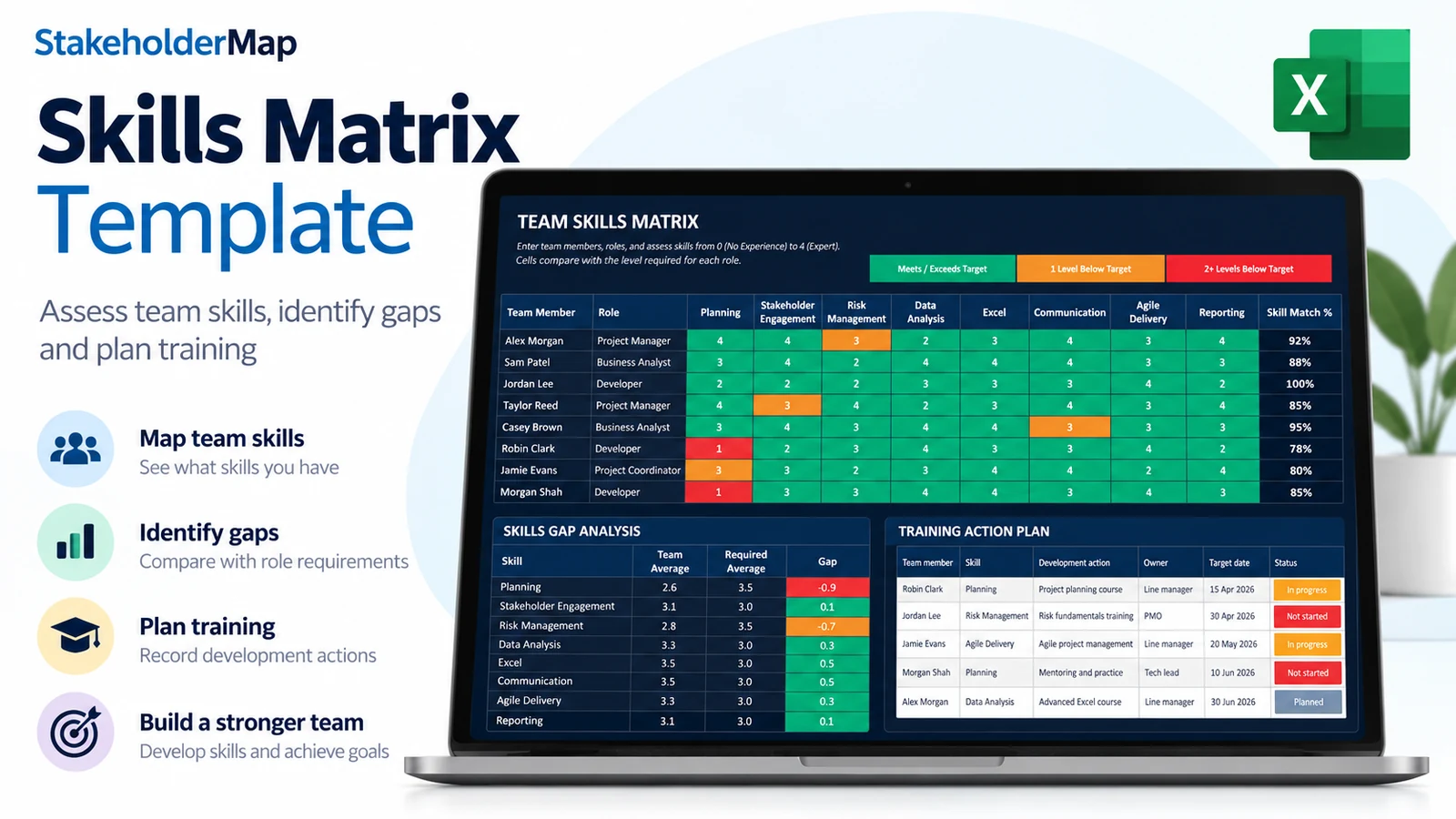
Need to know whether your team has the skills to deliver its work? Download our free skills matrix template for Excel. It helps you record people's skills, compare them with the requirements of their roles and identify where training would help.
Choose a light or dark version. Both include six worksheets, example data, automatic gap calculations and a dashboard. No macros or account are needed.
Contents
Download the free skills matrix templates
Both templates have the same features. Choose the appearance that works best for you.
Light theme
A clean, bright spreadsheet suited to printing and sharing in reports.
Download light Excel template.xlsx file
Dark theme
A navy design with high-contrast text and clear green, amber and red indicators.
Download dark Excel template.xlsx file
The downloads contain fictional example team members. Replace them with your own information. Each theme is a separate workbook.
What is included in the skills matrix template?
| Worksheet | What it does | What you enter |
|---|---|---|
| Skills Matrix | Shows each team member's skills and role-based colour indicators. | Names, roles and scores from 0 to 4. |
| Role Targets | Sets the proficiency level each role needs for each skill. | Role names and required scores. |
| Gap Analysis | Calculates where current scores fall below role targets. | Nothing. It updates from your inputs. |
| Dashboard | Summarises the team's scores and gaps. | Nothing. Check the source data is complete. |
| Training Plan | Records actions to develop missing skills. | Training actions, dates and progress. |
| Read Me | Explains the workbook and scoring rules. | Nothing. |
How to use the skills matrix
- Open Read Me. Save a working copy and review the scoring guide.
- Set your Role Targets. Enter each role and the level required for all eight skills. The example targets are not universal standards.
- Assess your team. On Skills Matrix, replace the fictional names, select the roles and enter each person's skill scores.
- Review Gap Analysis and Dashboard. Look for gaps that matter to the work your team needs to deliver.
- Agree development actions. Add them to Training Plan, then reassess the skills after training or practical experience.
The workbook provides space for 30 team members and 18 roles. Its eight example skills can be renamed to suit your team. Update Skills Matrix, Role Targets, Gap Analysis and Dashboard in the same order, as explained in Read Me.
How the skills scoring and colours work
Score each skill from 0 to 4. A blank cell means the skill has not yet been assessed; it is not the same as a score of zero.
| Score | Meaning |
|---|---|
| 0 | No experience |
| 1 | Awareness |
| 2 | Basic: can work with support |
| 3 | Independent: can work without routine help |
| 4 | Expert |
The colours are based on the role target, not the score alone. Someone scoring 2 can be green if their role requires level 2. Someone scoring 3 can be amber if their role requires level 4.
| Indicator | Meaning |
|---|---|
| Green | Current score meets or exceeds the role target. |
| Amber | Current score is one level below the role target. |
| Red | Current score is at least two levels below the role target. |
| No indicator | Score is blank or a matching role target is unavailable. |
Worked example: finding a training need
Suppose a Project Manager needs Risk Management at level 4 but currently scores 3. The matrix shows amber and Gap Analysis reports a gap of 1. You might add a training action such as leading a risk workshop with an experienced colleague.
Once the person has developed the skill, reassess it and update their score in Skills Matrix. Completing an action in Training Plan does not automatically change a proficiency score.
The gap calculation is MAX(0, required level - current score). A zero gap means the requirement is met, while a positive result shows the number of levels still needed.
When is a skills matrix useful?
Use a skills matrix when you are planning a project team, preparing for a new service, reviewing training needs or checking whether critical knowledge is concentrated in too few people. It can also help managers have more specific development conversations.
It is a starting point for discussion, not a substitute for practical evidence of someone's ability. Agree how skills will be assessed and use the same approach across the team.
Frequently asked questions
Can I change the skills and roles?
Yes. Replace the example skills and roles with your own. Keep the skill headings aligned across the sheets so the comparisons still make sense.
Does the spreadsheet identify training automatically?
It calculates skills gaps. You decide which gaps need action and enter the development plan manually.
What is the difference between a skills matrix and a training plan?
The skills matrix shows current ability against requirements. The training plan records what you will do about any gaps.
Why do some cells have no colour?
Check whether the score is blank and whether the person's role matches a role in Role Targets. Unassessed skills should stay blank rather than being scored zero.
Can I use the template without macros?
Yes. The workbooks are standard Excel .xlsx files and do not require macros.
Ready to map your team's skills?
Choose your preferred theme and start with the example data.
Light templateDark template