

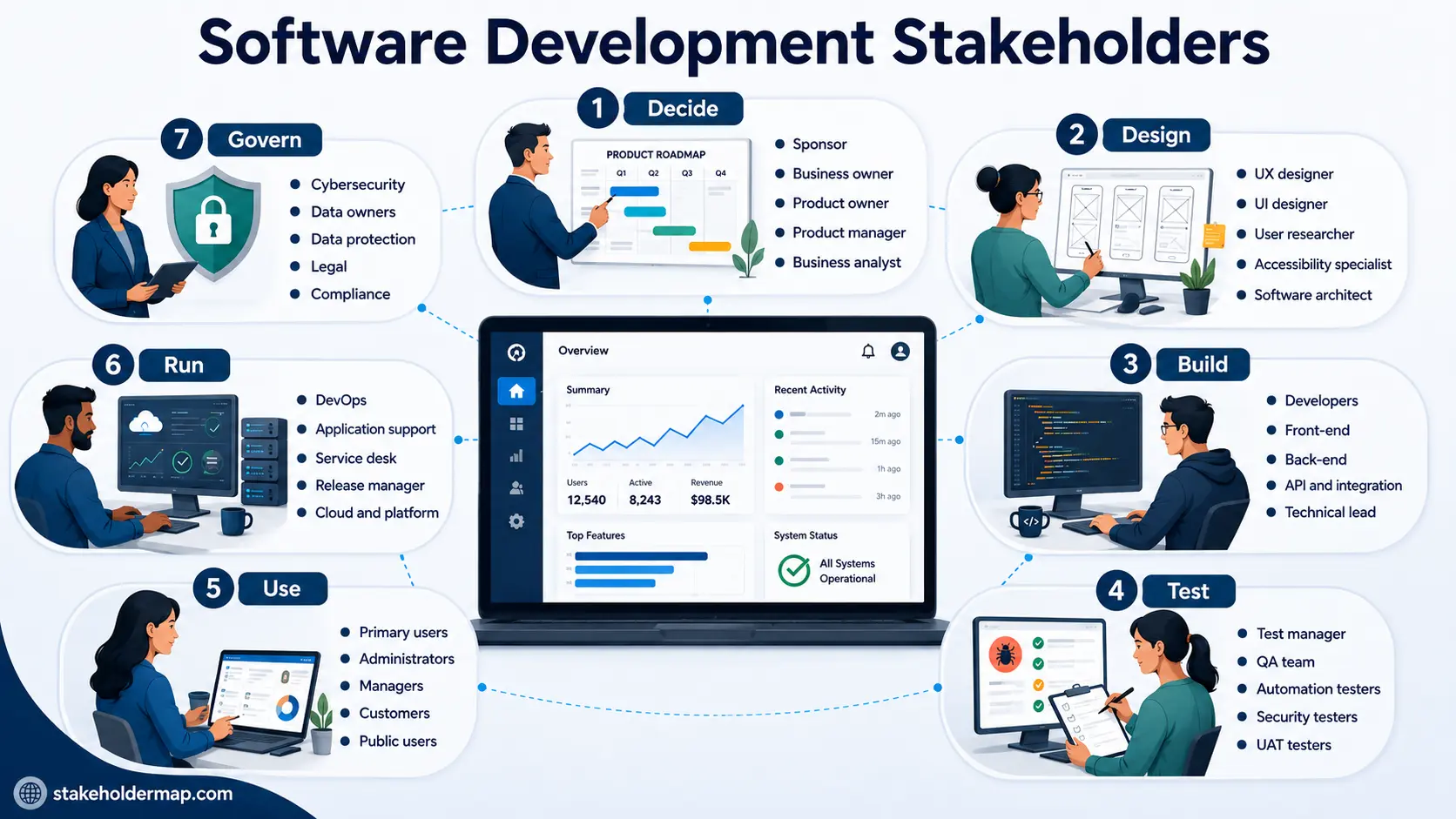
Software development stakeholders are the people and groups who can affect a software product, or who may be affected by it. They include the people who decide what to build, design it, write the code, test it, use it, support it and make sure it is safe and compliant.
Use this list as a checklist when identifying stakeholders for a software project. You will not need everyone listed here. The aim is to help you spot people who are easy to miss.
Table of Contents:
- Software development stakeholder list
- 1. Decide
- 2. Design
- 3. Build
- 4. Test
- 5. Use
- 6. Run
- 7. Govern
- External suppliers and dependencies
- People affected by the software
- Software stakeholder example
- Stakeholders that are often missed
- How to identify software stakeholders
- Quick checklist
- What to do next
Software development stakeholder list
Software projects can involve dozens of different stakeholders. The main groups are:
Create your own software stakeholder list
Tick the stakeholders that apply to your project. You can select them all, clear the list, then download your selection as an Excel workbook or copy it ready to paste into Google Sheets.
The Excel file is created on your device. The spreadsheet library is only loaded when you click Download Excel, so it does not add to the initial page load. The workbook also contains a Resources worksheet with useful StakeholderMap.com links.
Decide
- Project sponsor
- Business owner
- Product owner
- Product manager
- Business analyst
- Subject matter experts
- Process owners
Design
- UX designers
- UI designers
- User researchers
- Interaction designers
- Service designers
- Content designers
- Accessibility specialists
- Software architects
- Solution architects
Build
- Software developers
- Front-end developers
- Back-end developers
- Full-stack developers
- Mobile developers
- API developers
- Integration developers
- Database developers
- Data engineers
- Technical leads
Test
- Test manager
- Test analysts
- QA team
- Automation testers
- Performance testers
- Security testers
- Penetration testers
- Accessibility testers
- UAT testers
Use
- Primary users
- Occasional users
- Administrators
- Managers
- Customers
- Members of the public
- Prospective users
- Users with accessibility needs
Run and govern
- DevOps engineers
- Application support
- Service desk
- Release manager
- Platform and cloud teams
- Cybersecurity
- Data owners
- Data protection
- Legal and compliance
- Regulators
That gives you a fast starting point. The sections below explain when each stakeholder matters and what they bring to a software project.
1. Decide: people who decide what the software should do
These stakeholders define why the software is needed, what problem it should solve and which features matter most.
Project sponsor
The project sponsor provides senior backing for the work. They may secure funding, remove major obstacles and support decisions that the delivery team cannot make alone.
Business owner
The business owner is responsible for the part of the organisation that needs the software. They help make sure the product solves a real business problem, rather than becoming an expensive technical exercise.
Product owner
The product owner sets priorities for the development team. They may manage the product backlog, clarify requirements and decide whether completed work meets the need.
Product manager
A product manager looks at the wider direction of the product, including users, customer needs, features, competing products and future development.
Business analyst
The business analyst helps turn business needs into clear requirements. They often work between users, managers and the technical team.
Subject matter experts
Subject matter experts provide detailed knowledge of the work the software will support.
For example, software for a university may need input from admissions staff, academics and student support teams. Healthcare software may need input from clinicians and administrative staff.
Process owners
A process owner understands the business process that the software will change. They can explain what happens now, where problems occur and what the new system must support.
2. Design: people who design the software
Good software does not start with code. It starts with understanding what people need and designing a product they can use.
UX designers
User experience designers focus on how easy and effective the software is to use. They may design user journeys, workflows, prototypes and screen layouts.
UI designers
User interface designers focus on the appearance and behaviour of screens, controls and visual elements.
User researchers
User researchers speak to users, observe how they work and test ideas before the team spends time building them.
Interaction designers
Interaction designers focus on how people move through the product and complete tasks.
Service designers
The software may be only one part of a wider service. Service designers look at how the product fits with people, processes and other channels.
Content designers
Content designers make labels, instructions, error messages and other software content easy to understand.
Accessibility specialists
Accessibility specialists help make sure people with disabilities can use the product.
They may advise on:
- keyboard navigation;
- screen reader support;
- colour contrast;
- forms;
- text size; and
- accessible navigation.
Software architect
The software architect makes major decisions about the structure of the product, technologies, components, scalability and technical design.
Solution architect
A solution architect looks at how the software fits with other systems and technology used by the organisation.
3. Build: people who create the software
These are the stakeholders who turn designs and requirements into working software.
Software developers
Software developers write, change and maintain the code.
Developers are stakeholders, not simply resources. Their knowledge can expose hidden complexity, technical risks and better ways to solve a problem.
Front-end developers
Front-end developers build the parts of the software that users see and interact with.
Back-end developers
Back-end developers build the processing, services and logic behind the application.
Full-stack developers
Full-stack developers work across both front-end and back-end development.
Mobile developers
Mobile developers build applications for phones and tablets.
API developers
API developers create interfaces that allow systems to exchange information.
Integration developers
Integration developers connect the software to other systems.
A customer portal, for example, might connect to:
- a CRM;
- a payment service;
- an identity service;
- an email platform; and
- internal databases.
Database developers
Database developers create and change the structures used to store application data.
Data engineers
Data engineers build the pipelines and processes that move data between systems.
Technical lead
The technical lead gives the development team day-to-day technical direction and helps resolve difficult technical decisions.
4. Test: people who check the software
Testing stakeholders help find defects, weaknesses and usability problems before users do.
Test manager
The test manager plans and oversees testing.
Test analysts
Test analysts create tests and check whether the product behaves as expected.
Quality assurance team
Quality assurance staff look at the quality of the product and the processes used to create it.
Automation testers
Automation testers build repeatable tests that can quickly check whether important functions still work after changes.
Performance testers
Performance testers check speed, capacity, response times and stability.
Security and penetration testers
Security testers look for weaknesses that could put systems or information at risk. Penetration testers try to find ways those weaknesses could be exploited.
Accessibility testers
Accessibility testers check whether people using keyboards, screen readers and other assistive technology can complete important tasks.
User acceptance testers
User acceptance testing, or UAT, checks whether the software meets the needs of the business.
UAT should involve people who understand the real work. A technically correct system can still fail if it does not support the way people need to use it.
5. Use: people who use the software
Users are obvious stakeholders. Oddly, they are also among the easiest people for a software project to under-involve.
Primary users
Primary users work with the product regularly. They often know practical problems that managers and project teams cannot see.
Occasional users
Some people may use the system only a few times a year. Their tasks can still be important.
Administrators
Administrators may create accounts, manage permissions, change settings or maintain data.
Managers
Managers may use dashboards, reports or information produced by the system without using its day-to-day functions.
Customers
For commercial software, the person buying the product may not be the person who uses it. Treat customers and users as separate stakeholders where necessary.
Members of the public
Public-facing software may affect a large and diverse group of users with different levels of technical knowledge and different accessibility needs.
Do not let managers speak for every user
Managers understand the organisation. Users understand what happens when somebody actually tries to complete the task. You usually need both perspectives.
6. Run: people who keep the software working
A common mistake is to identify everyone needed to build the software and forget the people who inherit it after launch.
DevOps engineers
DevOps engineers help automate builds, testing, deployments and infrastructure.
Site reliability engineers
Site reliability engineers focus on availability, monitoring, performance and recovery when something fails.
Application support team
Application support staff investigate problems with the live product.
They are useful stakeholders during development because they often know where existing systems cause users the most trouble.
Service desk
The service desk is often the first place users go when something stops working.
Release manager
The release manager plans and controls the movement of software into live environments.
Platform and cloud teams
Platform and cloud teams manage shared infrastructure and services on which the software depends.
Database administrators
Database administrators may manage access, backups, performance and recovery for production databases.
7. Govern: people who make sure the software is safe and controlled
Governance stakeholders may not write code or use the finished product, but they can impose requirements that fundamentally affect its design.
Cybersecurity team
The cybersecurity team may set security requirements, review designs and assess risks.
Data owners
Data owners are responsible for important sets of information used by the software.
Data protection specialists
Software that uses personal information may need input from data protection specialists or the organisation's Data Protection Officer.
Legal team
The legal team may advise on:
- contracts;
- intellectual property;
- software licences;
- terms and conditions; and
- legal duties.
Compliance team
Compliance staff help make sure the software follows relevant rules and industry standards.
Risk and audit teams
Risk and audit teams may look at security, data, suppliers, resilience and controls.
Regulators
External regulators can be important stakeholders in areas such as banking, healthcare, government and critical infrastructure.
External software suppliers and dependencies
Most modern software depends on services supplied by other organisations. Those organisations are stakeholders too.
They may include:
- software vendors;
- development agencies;
- consultants;
- cloud providers;
- hosting providers;
- SaaS providers;
- payment providers;
- identity providers;
- API providers;
- data providers;
- cybersecurity suppliers;
- open-source communities; and
- specialist contractors.
An API provider can look like a technical dependency rather than a stakeholder. But if that provider changes its service, price or interface, your product may stop working.
People affected by the software who do not use it
This is one of the most useful questions you can ask during software stakeholder identification:
Who will experience a change because this software exists?
Someone does not need to log into a system to be affected by it.
For example:
- an employee scheduling system may change when people work;
- a finance system may change how suppliers are paid;
- an application system may affect people applying for a service;
- an algorithm may influence decisions about customers; and
- automation may change somebody's job.
Possible stakeholders include:
- employees whose work changes;
- contractors;
- suppliers;
- customers affected by decisions;
- employee representatives;
- partner organisations;
- people whose data is held in the system; and
- people affected by automated decisions.
Example: stakeholders for a customer portal
Imagine a company is developing an online portal where customers can log in, view their account, update details, make payments and contact customer services.
| Group | Example stakeholders |
|---|---|
| Decide | Project sponsor, Head of Customer Services, product owner, product manager, business analyst |
| Design | UX designer, UI designer, user researcher, accessibility specialist, solution architect |
| Build | Front-end developers, back-end developers, API developers, integration developers, database developers |
| Test | Test manager, test analysts, automation testers, security testers and customers taking part in usability testing |
| Use | Existing customers, new customers, customer service advisers, managers and administrators |
| Run | DevOps, cloud team, application support, service desk and release manager |
| Govern | Cybersecurity, Data Protection Officer, legal and compliance |
| External | Payment provider, identity provider, cloud provider and CRM supplier |
This is only the starting list. The next step is to decide which people have the greatest influence, interest and impact.
Software stakeholders that are often missed
The obvious stakeholders usually make the first list. The dangerous ones are the people nobody remembered until late in the project.
Before you finish, check for:
- accessibility specialists;
- application support;
- people affected by the software who never use it;
- owners of systems your software connects to;
- data owners;
- third-party API providers;
- cybersecurity teams;
- real users for UAT;
- service desk staff;
- people responsible for live operations;
- people responsible for keeping or deleting data;
- software suppliers; and
- people whose jobs or processes will change.
How to identify software development stakeholders
Work through the software life cycle rather than trying to remember job titles from a blank sheet of paper.
Why is the software being built?
- Who asked for it?
- Who is paying for it?
- Who owns the business problem?
- Who decides whether it has succeeded?
Who will design and build it?
- Who designs the user experience?
- Who writes the software?
- Who owns the technical architecture?
- Who owns the data?
- Who builds the integrations?
Who will test it?
- Who tests functionality?
- Who tests security?
- Who tests accessibility?
- Who carries out UAT?
Who will use it?
- Who uses it every day?
- Who uses it occasionally?
- Who administers it?
- Who receives information from it?
What does it depend on?
Identify the owners or suppliers of:
- systems;
- APIs;
- databases;
- cloud services;
- external platforms; and
- specialist software.
Who will run it?
- Who releases it?
- Who monitors it?
- Who supports users?
- Who fixes it?
- Who responds when it fails?
Who governs it?
- Who is responsible for security?
- Who is responsible for privacy?
- Who checks legal requirements?
- Who checks compliance?
- Does a regulator have an interest?
Who will be affected?
Finally, ask who will be affected by the software even if they never use it. This question often finds the stakeholders everyone else missed.
Software development stakeholder checklist
Use this shorter list as a final check before completing your stakeholder identification.
- Project sponsor
- Business owner
- Product owner
- Product manager
- Business analyst
- Subject matter experts
- Process owners
- UX and UI designers
- User researchers
- Accessibility specialists
- Software and solution architects
- Software developers
- API and integration developers
- Database and data specialists
- Technical lead
- Test and QA teams
- UAT testers
- Primary users
- Occasional users
- Administrators
- Customers
- People affected but not using the product
- DevOps
- Application support
- Service desk
- Release management
- Cloud or platform teams
- Cybersecurity
- Data owners
- Data protection
- Legal and compliance
- External software suppliers
- API and cloud providers
- Regulators
What to do next
Identifying the stakeholders is only the first step.
Once you have your list, you can:
- add them to a stakeholder register ;
- carry out a stakeholder analysis ;
- assess their influence, interest, needs and concerns;
- create a stakeholder map ; and
- decide how you will engage your stakeholders .
If you are managing a broader technology project, including networks, infrastructure or hardware, use our IT project stakeholder list .
You can also browse more industry and project-specific lists in our stakeholder lists index .
Summary
Software development stakeholders include much more than developers and users.
A good stakeholder list should cover the people who decide, design, build, test, use, run and govern the software. It should also include external suppliers and people who are affected by the product without directly using it.
Use the list on this page as a checklist. Then focus your stakeholder analysis on the people and groups who can most affect the project, or who will be most affected by it.