

20 Most Common Project Risks – Free Excel Risk Register
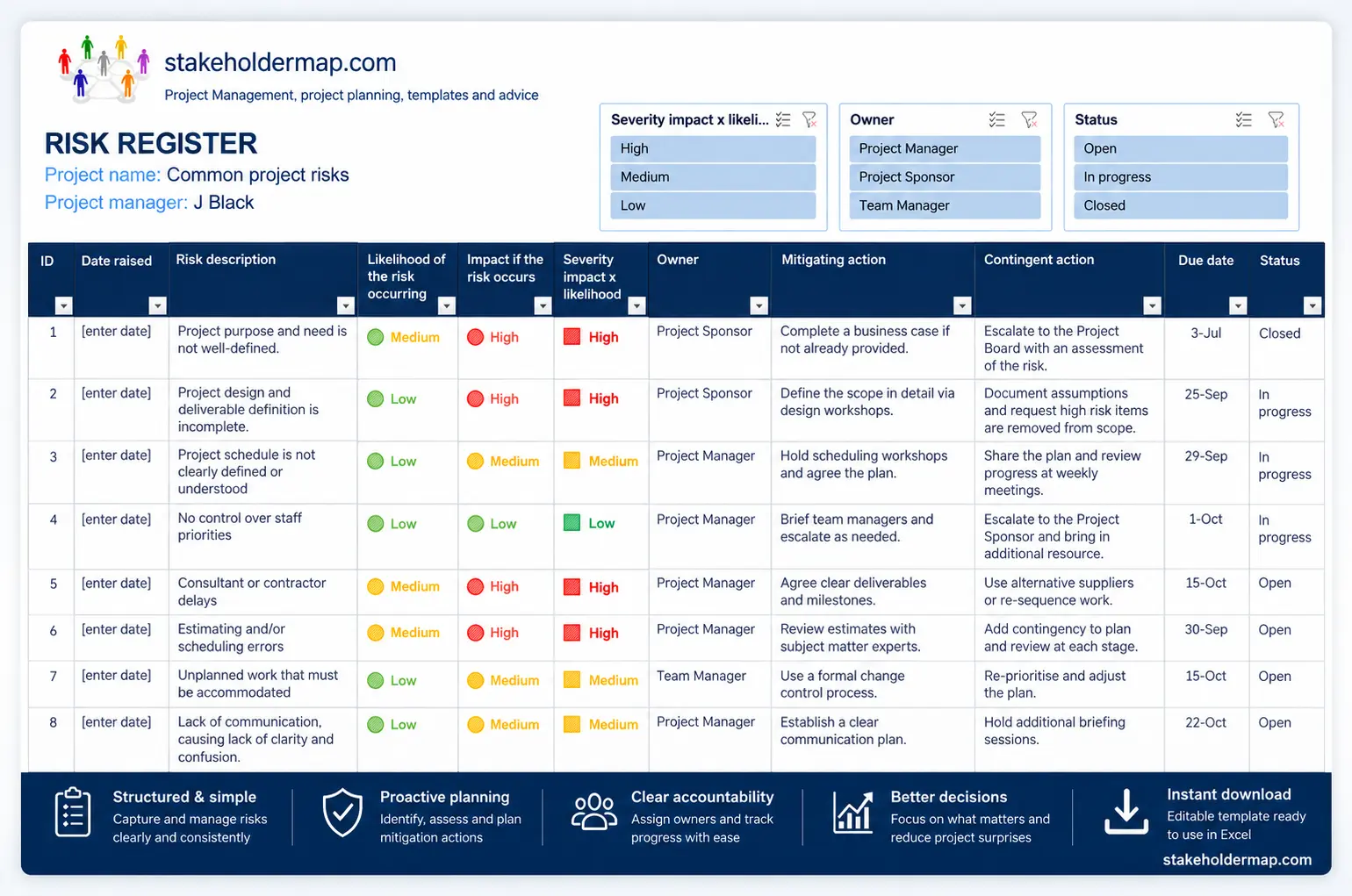

Example data from the Excel template. Use the arrows to view the register and dashboard; select an image to enlarge it.
Want a head start on your risk management? Use these 20 common project risks to spot gaps in your own register and find practical actions to tackle them. The free Excel template comes pre-filled with example ratings, suggested owners, mitigation actions and contingency plans.
What is included in the risk register?
- 20 of the most common project risks that can affect schedule, cost, quality, scope, suppliers, approvals, resources and stakeholders.
- Example likelihood, impact and severity ratings for each risk.
- Suggested risk owners, including project sponsor, project manager and team manager roles.
- Mitigating actions to reduce the likelihood or impact of each risk.
- Contingency actions to use if the risk happens.
- Progress and status fields for tracking risk actions during project delivery.
- Excel .xlsx and legacy .xls download options.
Quick index: the 20 common project risks
Select a risk to open its mitigating and contingency actions in the completed register below.
- Project purpose and need is not well-defined. View actions for risk 1
- Project design and deliverable definition is incomplete. View actions for risk 2
- Project schedule is not clearly defined or understood. View actions for risk 3
- No control over staff priorities. View actions for risk 4
- Consultant or contractor delays. View actions for risk 5
- Estimating and/or scheduling errors. View actions for risk 6
- Unplanned work that must be accommodated. View actions for risk 7
- Lack of communication, causing lack of clarity and confusion. View actions for risk 8
- Pressure to arbitrarily reduce task durations and or run tasks in parallel which would increase risk of errors. View actions for risk 9
- Scope Creep. View actions for risk 10
- project conflicts not resolved in a timely manner. View actions for risk 11
- Business Case becomes obsolete or is undermined by external or internal changes. View actions for risk 12
- Delay in earlier project phases jeopardizes ability to meet fixed date. For example delivery of just in time materials, for conference or launch date. View actions for risk 13
- Added workload or time requirements because of new direction, policy, or statute. View actions for risk 14
- Inadequate customer testing leads to large post go live defect list. View actions for risk 15
- Legal action delays or pauses project. View actions for risk 16
- Customer refuses to approve deliverables/milestones or delays approval, putting pressure on project manager to 'work at risk'. View actions for risk 17
- Theft of materials, intellectual property or equipment. View actions for risk 18
- Acts of God for example, extreme weather, leads to loss of resources, materials, premises etc. View actions for risk 19
- Stakeholder action delays the project. For more on the damage stakeholders can do see our case studies of real world projects that faced costs running into millions, because of stakeholder actions. View actions for risk 20
Completed risk register with 20 project risks you need to manage
Explore the example risks below. Each card shows the likelihood, impact, severity, owner and status. Select View actions to read the mitigating action, contingency action and progress.
These ratings and owners are examples. Adjust them for your own project.
Showing all 20 risks
Understanding the ratingsMitigation vs contingency
No risks match these filters. Try another search or select Clear filters.
Project purpose and need is not well-defined.
View actionsHide actions for risk 1
Mitigating action
Before the risk happens
Contingency action
If the risk happens
Progress on actions
Project design and deliverable definition is incomplete.
View actionsHide actions for risk 2
Mitigating action
Before the risk happens
Contingency action
If the risk happens
Progress on actions
Project schedule is not clearly defined or understood
View actionsHide actions for risk 3
Mitigating action
Before the risk happens
Share the schedule and go through upcoming tasks at each weekly project progress meeting.
Contingency action
If the risk happens
Progress on actions
No control over staff priorities
View actionsHide actions for risk 4
Mitigating action
Before the risk happens
Contingency action
If the risk happens
Progress on actions
Consultant or contractor delays
View actionsHide actions for risk 5
Mitigating action
Before the risk happens
Build in and protect lead time in the schedule.
Communicate schedule early.
Check in with suppliers regularly. Query '90% done'. Ask again and again if they need anything else.
Contingency action
If the risk happens
Progress on actions
Estimating/or scheduling errors
View actionsHide actions for risk 6
Mitigating action
Before the risk happens
Use two methods of cost estimation, and carefully track costs and forecast cost at completion making adjustments as necessary.
Build in 10% contingency on cost and scheduling.
Track schedules daily and include schedule review as an agenda item in every project team meeting.
Flag forecast errors and/or delays to the Project Board early.
Contingency action
If the risk happens
Raise a change request for changes to budget or schedule.
Pull down contingency.
Progress on actions
Unplanned work that must be accommodated
View actionsHide actions for risk 7
Mitigating action
Before the risk happens
Check previous projects, for actual work and costs.
Check all plans and quantity surveys.
Document all assumptions made in planning and communicate to the project manager before project kick off.
Contingency action
If the risk happens
Progress on actions
Lack of communication, causing lack of clarity and confusion.
View actionsHide actions for risk 8
Mitigating action
Before the risk happens
Identify stakeholders early and make sure they are considered in the communication plan. Use most appropriate channel of communication for audience e.g. don't send 3 paragraph email to Developers, have a call instead.
Contingency action
If the risk happens
Progress on actions
Pressure to arbitrarily reduce task durations and or run tasks in parallel which would increase risk of errors.
View actionsHide actions for risk 9
Mitigating action
Before the risk happens
Patiently explain that schedule was built using the expertise of subject matter experts. Explain the risks of the changes. Share the Dennis Lock quote at Why you should never arbitrarily reduce task durations.
Contingency action
If the risk happens
Hold emergency risk management call with decision makers & source of pressure and lay out risk and impact.
Progress on actions
Scope Creep
(the adding of features and functionality without assessing the impact on time, costs, and resources, or without customer approval).
View actionsHide actions for risk 10
Mitigating action
Before the risk happens
Contingency action
If the risk happens
Unresolved project conflicts not escalated in a timely manner
View actionsHide actions for risk 11
Mitigating action
Before the risk happens
Contingency action
If the risk happens
Progress on actions
Business Case becomes obsolete or is undermined by external or internal changes.
View actionsHide actions for risk 12
Mitigating action
Before the risk happens
Contingency action
If the risk happens
Progress on actions
Delay in earlier project phases jeopardizes ability to meet fixed date. For example, delivery of just in time materials, for conference or launch date.
View actionsHide actions for risk 13
Mitigating action
Before the risk happens
Contingency action
If the risk happens
Progress on actions
Added workload or time requirements because of new direction, policy, or statute
View actionsHide actions for risk 14
Mitigating action
Before the risk happens
Contingency action
If the risk happens
Progress on actions
Inadequate customer testing leads to large post go live snag list.
View actionsHide actions for risk 15
Mitigating action
Before the risk happens
Contingency action
If the risk happens
Progress on actions
Legal action delays or pauses project.
View actionsHide actions for risk 16
Mitigating action
Before the risk happens
Contingency action
If the risk happens
Progress on actions
Customer refuses to approve deliverables/milestones or delays approval, putting pressure on project manager to 'work at risk'.
View actionsHide actions for risk 17
Mitigating action
Before the risk happens
Contingency action
If the risk happens
Progress on actions
Theft of materials, intellectual property or equipment.
View actionsHide actions for risk 18
Mitigating action
Before the risk happens
Contingency action
If the risk happens
Progress on actions
Acts of God for example, extreme weather, leads to loss of resources, materials, premises etc.
View actionsHide actions for risk 19
Mitigating action
Before the risk happens
Contingency action
If the risk happens
Progress on actions
Stakeholder action delays project.
View actionsHide actions for risk 20
Mitigating action
Before the risk happens
Contingency action
If the risk happens
Progress on actions
Common mistakes when using a risk register
A risk register is only useful if it is actively reviewed and updated. Avoid these common mistakes when adapting this example for your own project.
- Copying risks without tailoring them. Use the 20 risks as prompts, then rewrite them so they match your project, suppliers, stakeholders and constraints.
- Confusing mitigation with contingency. Mitigation is action taken before a risk happens; contingency is the backup plan if it happens.
- Leaving risks without owners. Every important risk needs a named owner who can monitor it and progress actions.
- Using ratings once and never reviewing them. Likelihood, impact and severity should change as the project changes.
- Recording vague actions. A good action should say what will be done, who will do it and when it will be reviewed.
- Not escalating high risks. High risks that threaten cost, schedule, scope or benefits should be visible to the project sponsor or project board.
Help using this risk register
The risk register includes likelihood, impact, severity, owners, mitigating actions and contingent actions. These guides explain how to use those fields properly.
How to use a risk register in Excel
Learn what each column means, how to add risks, assign owners and keep the register useful.
Likelihood, impact and severity
Understand how likelihood and impact combine to produce a Low, Medium or High severity rating.
Mitigation vs contingency
See the difference between action taken before a risk happens and the backup plan if it happens.
Download a complete risk register of common project risks
Download the template, review the example risks, then edit the descriptions, scores, owners and actions so they fit your own project. The .xlsx version is recommended for most users.
Excel download (.xlsx) - FREE Risk Register of Common Risks
Excel 1997 - 2003 download (.xls) - FREE Risk Register of Common Risks
MindMap download - FREE MindMap of Common Project Risks
Video - How to edit the risk register
Related risk management templates and guides
How to Use a Project Risk Register in Excel
Likelihood, Impact and Severity in a Risk Register
Mitigation vs Contingency in Project Risk Management
The Top 50 Business Risks and how to manage them!
Checklist of 30 Construction Risks
Download a Risk Register template
Overall Project Risk Assessment Template
Simple Risk Register Template
Frequently asked questions
What are common project risks?
Common project risks include unclear scope, poor communication, supplier delays, scheduling errors, inadequate testing, lack of resources, late approvals, stakeholder action and changes that undermine the business case.
What should be included in a project risk register?
A project risk register should include the risk description, likelihood, impact, severity, owner, mitigation action, contingency action, action progress and status. Some organisations also include trigger points, residual risk and review dates.
What is the difference between mitigation and contingency?
Mitigation is action taken before a risk happens to reduce its likelihood or impact. Contingency is the backup action used if the risk actually happens.
Can I use this risk register in Excel?
Yes. The template is provided as an Excel download and can be edited for your own project. The .xlsx file is the best option for most users, while the .xls file is included for older versions of Excel.
Should I use all 20 risks on my project?
No. Use the list as a starting point. Delete risks that do not apply, rewrite risks that need more context and add risks that are specific to your project, organisation, supplier or stakeholder environment.
Resources used in this article
Lock, D. (2007) Project Management Ninth Edition, Aldershot, England and Brookfield, Vt: Gower Publishing Limited© 2008 - 2099 T Morphy. stakeholdermap.com.